
Kubernetes, aka k8s, is an open-source Container Orchestration system for automating deployment, scaling and management of containerized applications & microservices. In simple words, one can cluster together groups of hosts running containers into logical units, and Kubernetes helps in easily & efficiently manage such clusters
Table of Contents
- Introduction
- Cluster Architecture
- Control Plane Components
- Kube-API Server
- ETCD
- Kube Controller Managers
- Kube Schedulers
- Node Components
- Kubelet
- Kube Proxy
- Container Runtime
- Request flow in Kubernetes
Introduction
Containers though similar to VMs, are more lightweight. They have their own filesystem, CPU, memory etc. but are decoupled from the underlying infrastructure and are thus portable across clouds & OS distributions.
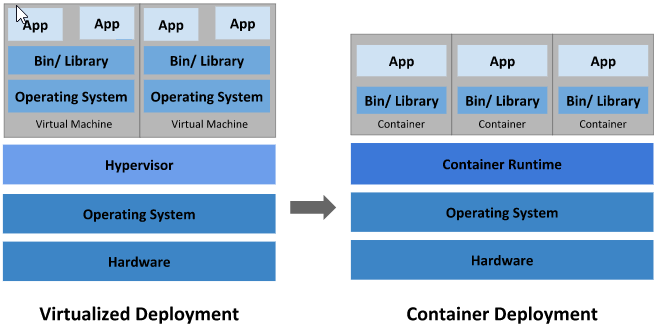
Kubernetes is a portable, extensible, open-source platform for managing containerized workloads and services, that facilitates both declarative configuration and automation. It provides a framework to run distributed systems resiliently.
Cluster Architecture
On deploying Kubernetes, you get a cluster which consistes of set of worker machine (depending on your estate), called Nodes, that run containerized applications. Each cluster has to have a minimum of 1 node.
The worker node(s) host the Pods that are the components of the application workload, while Control Plane manages the worker nodes & the Pods in the cluster. The following diagram represents the architecture

Control Plane Components
Various control plane’s components virtually run the cluster. They manage and monitor the nodes, as well as detecting & responding to cluster events eg. planning & scheduling various pods
Kube-API server
Primary Front-end component of the kubernetes control plane that exposes the Kubernetes API. Literally being the brain of the cluster, it holds the central position in controlling & coordinating with other control-plane & node components eg. authenticates & validates requests, retrieves/updates data from etcd, directs kubelet to perform actions like creating pods, services, deployments
Though setting up K8s cluster is a topic for another day, but kube-api server is avaialbe as binary from the k8s release page, if you wish to configure it as a service on your k8s master node
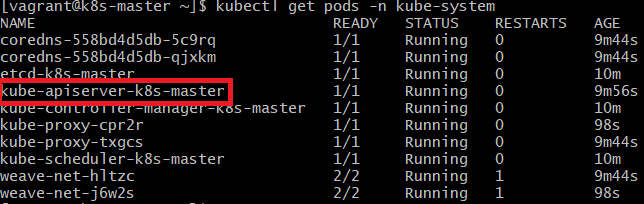
wget https://storage.googleapis.com/kubernetes-release/release/v1.13.0/bin/linux/amd64/kube-apiserverIf installed via kubeadm tool, api-server is deployed as a pod in the kube-system namespace on the master node.
p.s. k8s-master is the hostname of my master node
The various configuration options can be viewed from the definition yaml files for pod & services
cat /etc/kubernetes/manifests/kube-apiserver.yaml
cat /etc/systemd/system/kube-apiserver.service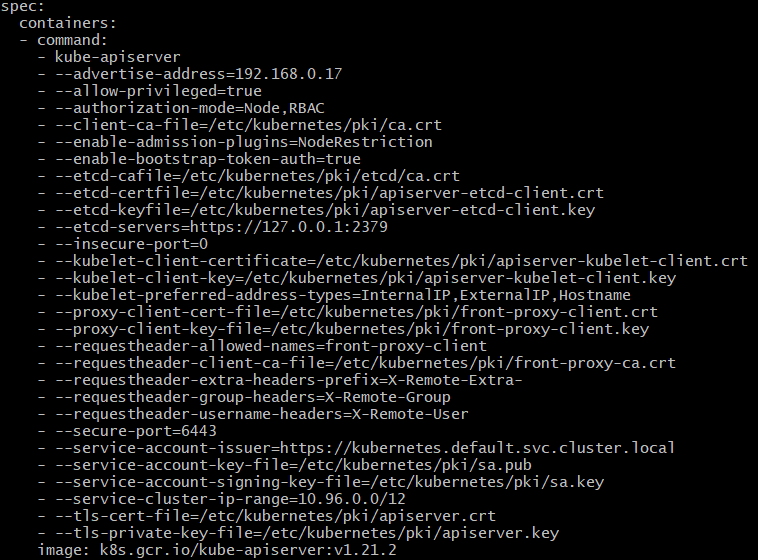
ETCD
etcd is a distributed, consistent and highly available key-value store that is Simple, Secure & Fast. It stores & retrieves small chunks of data (e.g. configuration data) in a ‘key’ & ‘value’ format enabling for fast read & write.
For manual installation the etcd binary can be downloaded, extracted and run as a service (details on installation in another post). Once executed, etcd run as a service on port 2379 and a uses etcdctl as the default client to store/retrive information.
./etcdctl set key value
./etcdctl get key
If installed via kubeadm tool, etcd is created as a pod in the kube-system namespace.
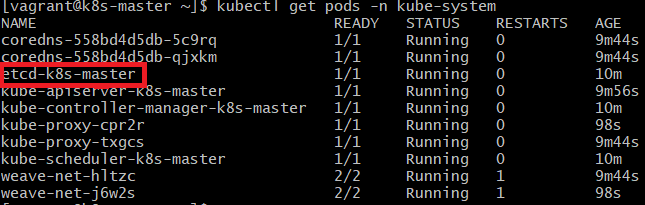
ETCD stores data about the cluster such as nodes, pods, configs etc. Every output of ‘kubectl get’ command displays data from the etcd server. Every changes to the cluster (adding additional nodes, updating pods, deployments etc) are updated in etcd server.
Kube Controller Managers
Controller Managers are the control-plane components that runs/ manages controller processes. A controller is a process that continously monitors the state of various components & works to bring the whole system in the ‘desired functioning state’. Few of many controllers are:
Node Controller – responsible for monitoring status of nodes & keep the application running
Replication Controller – monitors status of replicaset & maintains desired number of pods
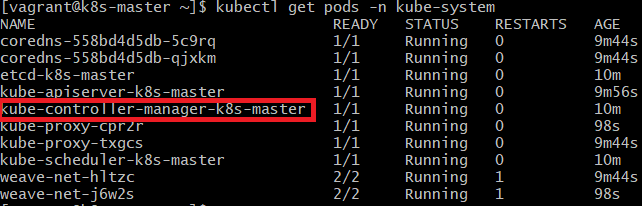
Logically, each controller is a separate process, but to reduce complexity, they are all compiled into a single binary and run in a single process. Controller Manager run as a pod in kube-system namespace
Kube Schedulers
Scheduler is ONLY responbile for deciding which pod goes on which node. The actual pod is created by kubelet, a node-component.
Schedules makes the placement decision based on criteria like resource requirements, limits, node-selectors, affinity rules, taints & tolerations etc.
As other control-plane components, if installed via kubeadm tool, kube-scheduler runs as a pod in kube-system namespace and It’s specifications can be viewed in the manifest file
cat /etc/kubernetes/manifests/kube-scheduler.yamlNode Components
Node components run on every node, maintaining running pods and providing the Kubernetes runtime environment
Kubelet
is an agent that runs on each node and ensures that containers are running in the pods. It takes a set of specifications and ensures that the containers described in those specs are running and healthy.
Kubelet leads all activities on the node & registers it with the k8s cluster. If instructed by the kube-scheduler to load a container/pod, kubelet requests container runtime engine (e.g. docker, rkt) to pull an image & run an instance. Once the pod is created, it monitors the state of pod/ containers & reports to API server.
Even if using kubeadm tool, the kubelet has to be manually installed on the worker node by downloading the installer, extracting it & running as a service.
Kubeproxy
Kube-proxy is a network proxy that runs on each node & maintains the network rules to allow communication to pods from network sessions inside or outside of the cluster. It is a virtual process that look for newly created services & creates appropriate rules to forward traffic to these new services to the backend pods. It does so with the help of IP Tables rules.
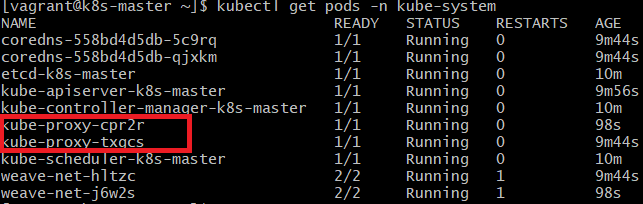
Kubeadm tool deploys kube-proxy as a daemonSet (1 pod on each node)
Container Runtime
The container runtime is the software that is responsible for running containers. K8s supports several container runtimes: Docker, containerd, CRI-O, rkt, and any implementation of the Kubernetes CRI (Container Runtime Interface)
Request flow in Kubernetes
For any request that is made to the k8s cluster, it follows a specific sequence. Let’s do a trace-route with an example of a request to create a pod
- request from user is authenticated by the API server
- request is validated by the API server
- API server creates a pod object, without assigning a node
- updates the information in the ETCD server
- API server updates the user that the pod has been created
- Scheduler that continuously monitors the API server, realises that there a new pod without a node
- Scheduler identified the right node to put the pod on
- communicates the node & pod information to the API server
- API server updates the ETCD server
- API server then passes this information to the Kubelet in appropriate worker node
- Kubelet then creates the pod on the node
- Kubelet instructs the Container Runtime Engine to deploy the application image
- Once done, Kubelet updates the status to the API server
- API server updates the data in the ETCD server
Similar pattern is followed each time any change is requested. All components coordinate to perform all the tasks needed for the change to complete, with API server in the middle of all action.
This lecture-like blog is a high-level introduction about relationship & roles of the various kubernetes components. I’ll be writing in details about individual components in future blogs.
till then Learn… Share… Grow…
Speak Your Mind